> For the complete documentation index, see [llms.txt](https://docs.superlend.xyz/llms.txt). Markdown versions of documentation pages are available by appending `.md` to page URLs; this page is available as [Markdown](https://docs.superlend.xyz/products/discover/filters-explained.md).
# Filters Explained
Filter and refine opportunities in Discover.
Filters help you narrow down opportunities in Discover so you can quickly find what you’re looking for.
***
### **Basic Filters**
* Search – find opportunities by asset name or symbol
* Earn / Borrow – switch between earning and borrowing opportunities
* Asset Categories – quickly filter by groups such as Stablecoins, ETH, or BTC
***
### **Advanced Filters**
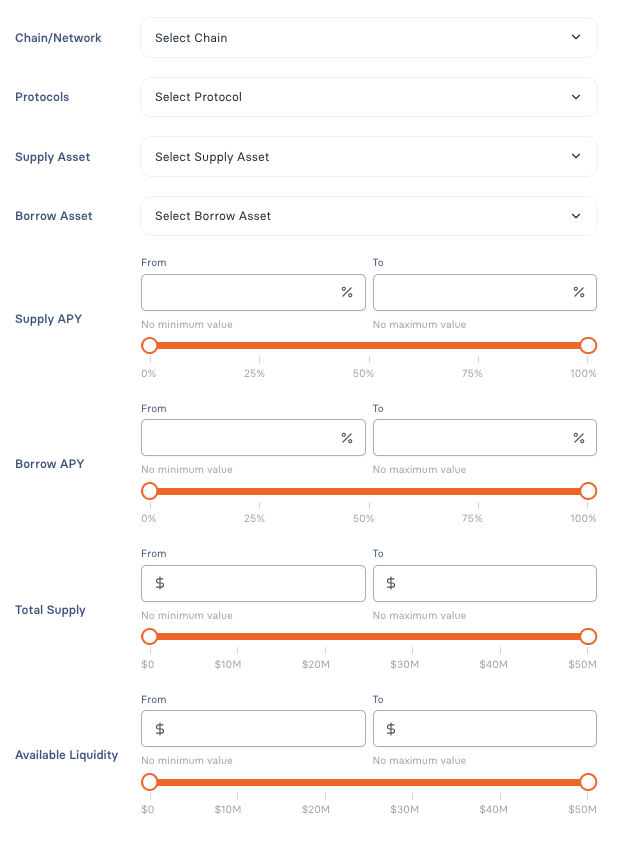
Advanced filters let you refine results using multiple criteria:
* Chain – filter by supported networks
* Platform – filter by the underlying protocol or product
* Supply Asset / Borrow Asset – show opportunities for specific assets
* Supply APY / Borrow APY – filter by interest rate ranges
* Total Supply – filter by market or strategy size
* Available Liquidity – filter by withdrawable or borrowable liquidity
***
### **Applying Filters**
* Apply Filters updates results based on your selection
* Reset Filters clears all active filters
Filters can be combined and adjusted at any time.